
Private Catalog Overview
What Is the Private Catalog?
The Private Catalog is your personal product catalog within the platform. Unlike the Aftermarket catalog (products from distributors like Parts Unlimited, Turn14, WPS, etc.) or the OEM catalog (manufacturer parts data), the Private Catalog contains products that you create and manage yourself.
Common uses:
- Selling used parts from unit teardowns
- Listing custom or specialty items you manufacture or source independently
- Selling private-label products under your own brand
- Offering services, apparel, or accessories not found in distributor catalogs
Private Catalog products appear on your webstore alongside Aftermarket products and can also be listed on eBay and Amazon marketplaces.
Product Hierarchy
Private Catalog products are organized in a three-level hierarchy:
Manufacturer (Brand)
  └── Product Group (the listing)
        └── Product (individual variation / SKU)
Manufacturer
The brand or maker of the product. Each manufacturer name must be unique within your account.
Example: "Smith's Custom Parts"
Product Group
A product listing that belongs to a manufacturer. The product group holds the shared name and description. On your webstore, each product group becomes one product page.
Example: "Carbon Fiber Fender Kit"
Product (Variation)
An individual SKU within a product group. Each product has its own part number, size, color, option, price, weight, dimensions, images, and inventory. On your webstore, products within the same group appear as variations (like size or color options) on the same product page.
Example:
- SKU: CFR-FENDER-SM (Size: Small, Color: Matte Black)
- SKU: CFR-FENDER-MD (Size: Medium, Color: Matte Black)
- SKU: CFR-FENDER-LG (Size: Large, Color: Gloss Red)
Simplified:
A Product is an MPN. There is only one MPN per product.
A Product Group is all the different variations of a single product. There are multiple MPNs in a Product Group.
In this example below, you see that all of these products have the same Name. This is the Product Group Name. Also notice how each line has a unique MPN, Size, Color. Each size/color variant has its own MPN.
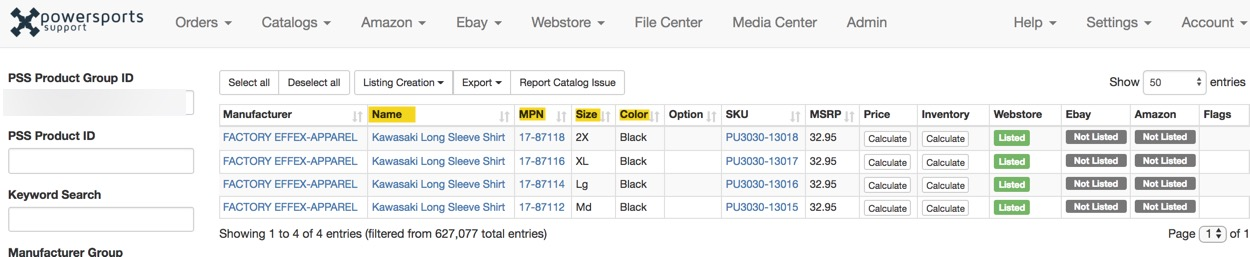
Important: Up to 20 variations per product group are displayed on the webstore (compared to 6 for Aftermarket products). This gives you more flexibility to offer size/color/option combinations.
How Pricing Works
Private Catalog products have two price fields:
- MSRP — Set when creating the product. This is the base/fallback price customers see if no sale price is set.
- Sale Price — Set in the Pricing & Inventory section after creating the product. This overrides MSRP and is the actual price customers pay.
If both are set, Sale Price takes priority. If both are blank, the product will show no price on the webstore. When a product group has variations at different prices, the webstore displays a price range (min–max).
How Inventory Works
Unlike Aftermarket products, private products have no distributor stock feeds. Your shelf quantity is the only source of truth.
- Quantity is the number you have on hand. It decrements automatically when a customer purchases the product.
- Lead Time tells the system how many days until the product is available when out of stock. If you set quantity to 0, lead time defaults to 5 days.
- Products with zero quantity will be hidden from the webstore if you have the In-Stock Only setting enabled (Settings > Webstore > Category & Search Results Pages > In-Stock Only).
- If In-Stock Only is set to either "Shelf & Distributor Quantities" or "Shelf Quantities Only," the behavior is identical for private products — they appear only if your shelf quantity is greater than zero.
- If In-Stock Only is Disabled, private products always appear regardless of quantity.
Important: Creating a product does not automatically set its inventory. After creating products — whether one at a time or via CSV import — you must separately set the quantity and sale price through the Pricing & Inventory section. Products without inventory set will not appear on your webstore if In-Stock Only is enabled.
Custom SKUs for Internal Tracking
If you need an internal SKU that differs from the public-facing MPN, use a colon (: ) as a delimiter in the Manufacturer Part Number field. Everything before the colon is the public MPN shown on marketplace listings; everything after is your internal reference, visible only in Ecommerce order records.
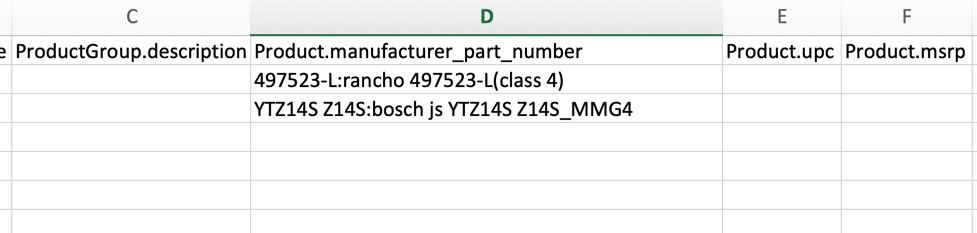
Example:
- MPN field:
497523-L:rancho 497523-L(class 4)→ eBay/Amazon displays:497523-L→ Orders show:497523-L:rancho 497523-L(class 4)
Best Practices
- Make sure the spelling a naming of your product groups is accurate
- Use Proper Capitalization
- Make sure your entries do not have any trailing spaces that would cause the cell to be unique
- Make sure that your MPNs are accurate and only appear once
- Do NOT use different formats or spelling for attributes. If you use Yellow, continue to use Yellow.
- Do NOT put size, color, option attributes in your Product Group Name.
- Do NOT put Manufacturer Group in your Product Group Names.
- Do NOT put fitment into your Product Group Names.