
Optimizing Titles & Descriptions
Your title is the biggest single factor in whether buyers find your listing on eBay. This article covers how you can build titles and subtitles in PSS, how to write titles that get found, and how to review listings that aren't selling.
What you'll learn
- How title hashes are initially built from the catalog data
- How to modify titles so they improve rank
- How to fix duplicate and too-long titles
- How to find and improve underperforming listings
How PSS builds original titles
PSS builds each title from a title hash: a string of tags that get replaced with the product's data when the listing is created.
| Tag | Fills in |
|---|---|
{%MANUFACTURER_GROUP%} |
Brand |
{%MPN%} |
Manufacturer part number |
{%ITEM_NAME%} |
Product name (Includes size, color, and options) |
📌 Note: The default title hash that PSS creates is {%MANUFACTURER_GROUP%} {%MPN%} {%ITEM_NAME%}. After the listing is created, you can modify the listing titles.
Examples
Manufacturer Group: Bell Helmets
MPN: 7152105
Item Name: Moto 3 Heritage Collection Solid Helmet
This becomes the listing title: Bell Helmets 7152105 Moto 3 Heritage Collection Solid Helmet XL Black
Manufacturer Group: Burly Brand
MPN: B30-1283
Item Name: Cable and Brake Line Kit - Stainless Braid
This becomes the listing title: Burly Brand B30-1283 Cable and Brake Line Kit - Stainless Braid
How to Modify Titles
-
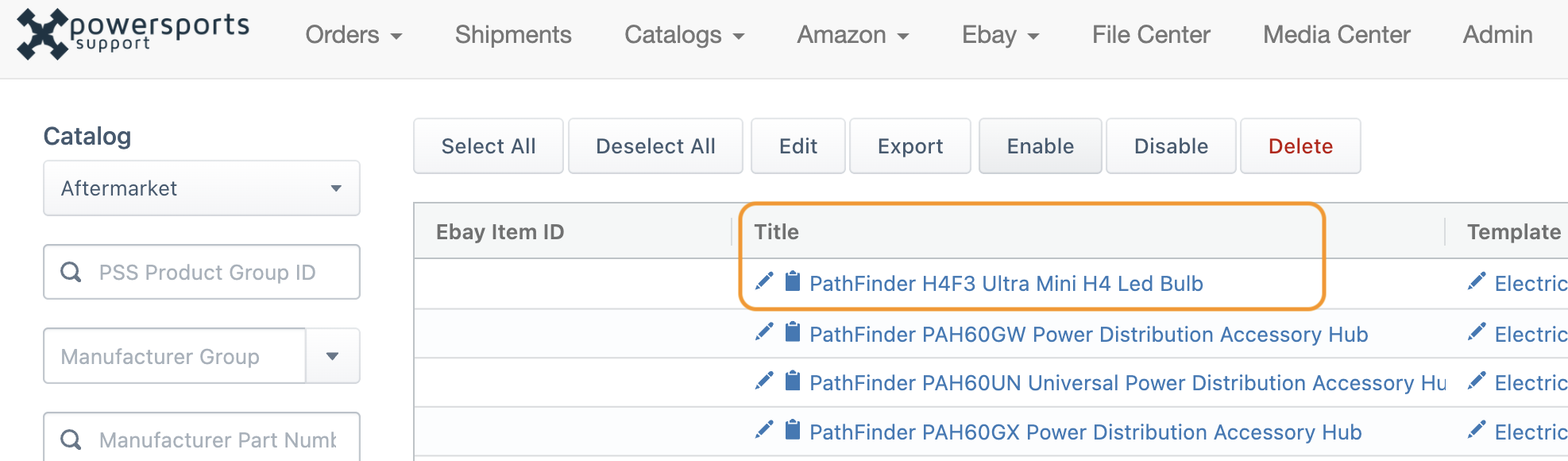
Navigate to your listings. From the PSS main nav. Click eBay > View All Listings

-
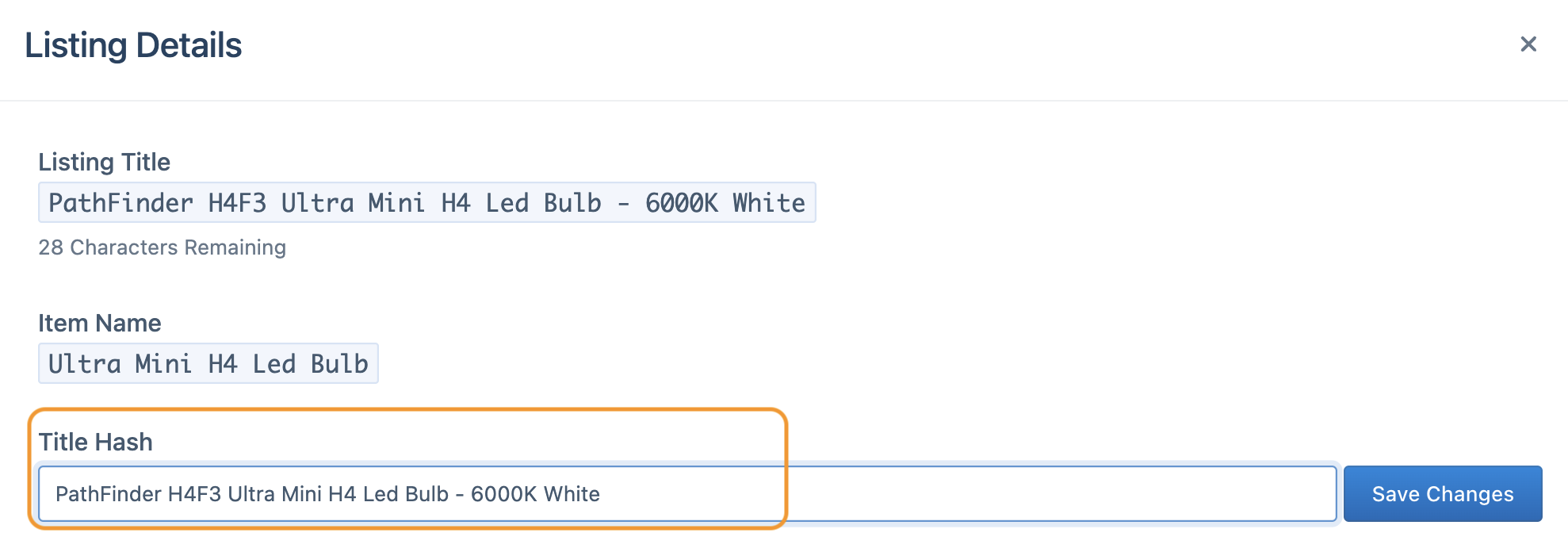
Click into a listing title. This will bring up the editor. Use the "Title Hash" field.
-
Add the words buyers actually type. Generic titles don't always get results. A single descriptive word can make the difference, and remember, you get 80 characters - use them all.
🏁 Quick Tips
- Feel free to work in some fitment. On shorter product names, you can squeeze in solid fitment.
- Don't stuff unrelated terms like other brands, "Best" or "Top rated." eBay penalizes it.
- Skip special characters and ALL CAPS.
Examples of title optimization
| Generic | Better |
|---|---|
| 100% 50059-00004 Armatic Goggles OSFM Yellow | 100% 50059-00004 2025 Armatic Goggles OSFM Yellow with Clear Lens |
| Wiseco WPP3011 Clutch Basket | Wiseco WPP3011 Clutch Basket - fits 96 - 08 Suzuki RM250 |
| Parts Unlimited DS-719980 Radiator Grille | Parts Unlimited DS-719980 Radiator Grille - fits 1988-2000 Honda Goldwing 1500 |
| FMF Racing 21019 PowerCore 2 Shorty Silencer | FMF Racing 21019 Aluminum PowerCore 2 Shorty Silencer |
| Fly Racing Kinetic Women's Over Boot Pants | Fly Racing Kinetic Women's Over Boot Motorcycle Pants |
⚠️ Warning: eBay titles max out at 80 characters. Longer titles get flagged as Title Length and won't go live. Shorten the hash, edit the title in Managing Listings, or move extra words into the subtitle.
Variation-Style Listings
For variation listings, where buyers pick size and color on the page, use {%MANUFACTURER_GROUP%} {%TITLE%} instead.
You can mix tags with your own words. For example, {%MANUFACTURER_GROUP%} {%MPN%} {%ITEM_NAME%} - NEW adds "NEW" to every title.
Subtitles
A subtitle is a second line under your title in search results, with up to 55 characters. Use it for keywords that didn't fit, trust signals like "Authorized Dealer," or offers like "Free Shipping." Subtitles use the same tags as titles.
💡 Pro Tip: eBay normally charges for subtitles, but they're free for dealers in the eBay VIP program. If you're in VIP, use them on every listing.
Descriptions
Descriptions come from your listing template, built with data tags or your own HTML design. See Creating and Managing Listing Templates. When catalog data changes, PSS updates descriptions automatically in the daily revision feed. To write your own description for a specific product, see Overrides.
Duplicate titles
eBay discourages identical titles from the same seller, and PSS flags them as Duplicate Title. Fix them by changing the title hash on one listing, editing one title by hand, or adding a subtitle.
Improve underperforming listings
Some listings will always outsell others. Reviewing the weakest ones every quarter is one of the easiest ways to grow sales.
Find them
- In eBay Seller Hub: go to Listings > Active and open the Underperforming tab, or sort by views and sales. Look at a 30–90 day window.
- In PSS: filter and export your listings to a spreadsheet to compare across your catalog.
Fix them
| Likely cause | What to do |
|---|---|
| Priced above competitors | Check the same part number on eBay. Adjust with Pricing Rules or a price override. |
| Wrong category | Fix the template's primary category |
| Weak title keywords | Update the title hash, or add a subtitle |
| Poor or missing images | Replace them with better images |
| Missing item specifics | Fill in the specifics eBay recommends for the category |
| Not enough visibility in a crowded category | Try Promoted Listings |
You can also edit in bulk from the UI
You can also edit in bulk by importing a .csv file
Next step
Continue to EPIDs & Parts Compatibility.